🧭 WPF MVVM入门系列教程
- 一、MVVM模式介绍
- 二、依赖属性
- 三、数据绑定
- 四、ViewModel
- 五、命令和用户输入
- 六、ViewModel案例演示
🍠 WPF MVVM进阶系列教程
- 一、对话框
- 二、数据验证
- 三、使用依赖注入(Dependency Injection)
- 四、ViewModel通信
⌨️ WPF MVVM实战系列教程
- 一、Prism框架介绍
- 二、使用Visual Studio 创建Prism项目
- 三、创建Bootstrapper/启动器
- 四、区域导航
前言
正如前面所说,Prism框架是一个基于 WPF 的复合应用程序开发框架。Prism 实现了多项有助于编写结构良好且易于维护的 XAML 应用程序的设计模式,包括 MVVM、依赖注入、命令、事件聚合器等。
在后续的文章中,我们需要用到Prism框架里MVVM部分的知识,所以这里单独拿出来进行讲解。
在我前面的文章中,介绍过CommunityToolkit.MVVM包的使用,Prism的使用基本类似。
所以这里我不做详细介绍,只介绍如何使用,细节方面可以参考前面的文章:https://www.cnblogs.com/zhaotianff/p/16870550.html
ViewModelBase
在MvvmLight中,ViewModel一般都会继承自ViewModelBase类,在CommunityToolkit.Mvvm中,具有相同功能的类是ObservableObject。
在Prism中,这个类是BindableBase。BindableBase主要用于简化 MVVM 模式中 ViewModel 的属性变更通知实现,它封装了 WPF 中INotifyPropertyChanged接口的核心逻辑,让你无需重复编写属性变更通知的样板代码。
BindableBase主要封装了以下接口
 1  /// <summary>
 2  /// 值更改事件.
 3  /// </summary>
 4  public event PropertyChangedEventHandler PropertyChanged;
 5
 6  /// <summary>
 7  /// 属性赋值及通知
 8  /// </summary>
 9  protected virtual bool SetProperty<T>(ref T storage, T value, Action onChanged, [CallerMemberName] string propertyName = null);
10
11  /// <summary>
12  /// 引发PropertyChanged事件.
13  /// </summary>
14  protected void RaisePropertyChanged([CallerMemberName] string propertyName = null);
15
16  /// <summary>
17  /// 引发PropertyChanged事件.
18  /// </summary>
19  protected virtual void OnPropertyChanged(PropertyChangedEventArgs args);
BindableBase使用示例
我们在界面上放置一个TextBox,然后绑定到一个属性,用于实时显示时间
MainWindow.xaml
1 <Grid>
2     <TextBox Text="{Binding CurrentTime}" HorizontalAlignment="Center" VerticalAlignment="Center" Margin="0,0,0,80" Width="200"></TextBox>
3 </Grid>
MainWindowViewModel
 1 public class MainWindowViewModel : Prism.Mvvm.BindableBase
 2 {
 3     private string currentDate;
 4
 5     public string CurrentDate
 6     {
 7         get => currentDate;
 8         set => SetProperty(ref currentDate, value);
 9     }
10
11     public MainWindowViewModel()
12     {
13           CurrentDate = DateTime.Now.ToString();
14     }
15 }
DelegateCommand
DelegateCommand是命令的封装类,在MVVMLight和CommunityToolkit.MVVM包中,具有相同功能的类是RelayCommand。
它们的使用方法是一样的
MainWindow.xaml
例如我们在界面上放置一个按钮和一个文本框,只有当文本框输入值后,单击按钮,可以显示文本框的值
1  <StackPanel>
2      <TextBox Text="{Binding MsgContent}" Width="200" HorizontalAlignment="Left" ></TextBox>
3      <Button Content="显示消息" Command="{Binding ShowMessageCommand}" ></Button>
4  </StackPanel>
MainWindowViewModel.cs
 1 public class MainWindowViewModel : Prism.Mvvm.BindableBase
 2 {
 3     private string msgContent;
 4
 5     public string MsgContent
 6     {
 7         get => msgContent;
 8         set => SetProperty(ref msgContent, value);
 9     }
10
11     public DelegateCommand ShowMessageCommand { get; private set; }
12
13     public MainWindowViewModel()
14     {
15         ShowMessageCommand = new DelegateCommand(ShowMessage, CanShowMessageExecute);
16     }
17
18     private void ShowMessage()
19     {
20         System.Windows.MessageBox.Show(MsgContent);
21     }
22
23     public bool CanShowMessageExecute()
24     {
25         return !string.IsNullOrEmpty(MsgContent);
26     }
27 }
说明:
Prism没有提供代码生成器,所以无法使用源码生成器来快速生成属性、命令。
自动绑定ViewModel
在前面介绍MVVM中的Ioc时,介绍过AutoWireViewModel这种模式
https://www.cnblogs.com/zhaotianff/p/19002271
ViewModelLocator这种模式可以将ViewModel的绑定进行简化。
在Prism中,提供了ViewModelLocator.AutoWireViewModel附加属性,可以自动将ViewModel和View进行绑定。
使用方法如下:
1、创建界面在Views文件夹下,创建ViewModel在ViewModels文件夹下
ProjectRoot
--ViewModels
MainWindowViewModel.cs
--Views
MainWindow.xaml
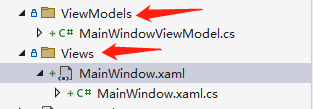
因为这里是通过反射来查找的,所以名称不能错。 ViewModelLocator.AutoWireViewModel只能查找同级命名空间下的ViewModel。
注意:
1、Views和ViewModels文件夹都是带s结尾的
2、ViewModel的命名要跟View保持一致。例如View的命名是MainWindow,则ViewModel的命名是MainWindowViewModel;View的命名是StudentView,则ViewModel的命名是StudentViewModel。
2、引入prism命名空间
1 xmlns:prism="http://prismlibrary.com/"
3、设置 ViewModelLocator.AutoWireViewModel=true
 1 <Window x:Class="_12_Prism_MVVM_Usage.Views.MainWindow"
 2         xmlns="http://schemas.microsoft.com/winfx/2006/xaml/presentation"
 3         xmlns:x="http://schemas.microsoft.com/winfx/2006/xaml"
 4         xmlns:d="http://schemas.microsoft.com/expression/blend/2008"
 5         xmlns:mc="http://schemas.openxmlformats.org/markup-compatibility/2006"
 6         xmlns:prism="http://prismlibrary.com/"
 7         xmlns:local="clr-namespace:_12_Prism_MVVM_Usage"
 8         mc:Ignorable="d"
 9         prism:ViewModelLocator.AutoWireViewModel="True"
10         Title="MainWindow" Height="450" Width="800">
11     <StackPanel>
12          ......
13     </StackPanel>
14 </Window>
这样ViewModel就会自动绑定到对应的View上。
此外,AutoWireViewModel除了可以自动绑定ViewModel,它还会自动判断ViewModel的构造函数,并注入相应的实例。
ViewModel通信