引入包
<!-- Freemarker 模版 -->
<dependency><groupId>org.springframework.boot</groupId><artifactId>spring-boot-starter-freemarker</artifactId>
</dependency><!-- html转pdf文档 -->
<dependency><groupId>com.itextpdf</groupId><artifactId>html2pdf</artifactId><version>6.3.0</version>
</dependency><!-- docx文件处理 -->
<dependency><groupId>org.docx4j</groupId><artifactId>docx4j</artifactId><version>6.1.2</version>
</dependency><!-- XHTML 导入支持(docx4j-html) -->
<dependency><groupId>org.docx4j</groupId><artifactId>docx4j-ImportXHTML</artifactId><version>8.3.11</version>
</dependency>
工具类
import com.itextpdf.html2pdf.ConverterProperties;
import com.itextpdf.html2pdf.HtmlConverter;
import com.itextpdf.layout.font.FontProvider;
import freemarker.template.Configuration;
import freemarker.template.Template;
import org.docx4j.convert.in.xhtml.XHTMLImporterImpl;
import org.docx4j.openpackaging.packages.WordprocessingMLPackage;
import org.docx4j.openpackaging.parts.WordprocessingML.MainDocumentPart;import javax.servlet.http.HttpServletResponse;
import java.io.IOException;
import java.io.OutputStream;
import java.io.StringWriter;
import java.net.URLEncoder;
import java.nio.charset.StandardCharsets;/*** 文档打印工具类* pdf 文档打印:freemarker(ftl模版填充字段后转为html) + itextpdf(html 转换为pdf文档)* docx 文档打印:freemarker(ftl模版填充字段后转为html) + docx4j(html 转换为 docx 文档)*/
public class DocumentPrintUtil {/*** 生成 pdf 文档** @param data         模版填充数据* @param templateName freemarker 模版名称(xxx.ftl)* @param filename     下载文件名称 (可带后缀)* @param inline       是否预览* @param response     web servlet*/public static void generateWebPdf(Object data, String templateName, String filename, boolean inline, HttpServletResponse response) {try (OutputStream outputStream = response.getOutputStream()) {// 设置文件格式String encodedFilename = URLEncoder.encode(filename + ".pdf", StandardCharsets.UTF_8.toString());response.setContentType("application/pdf");String disposition = inline ? "inline" : "attachment";response.setHeader("Content-Disposition", disposition + "; filename*=UTF-8''" + encodedFilename);response.setCharacterEncoding("UTF-8");// 生成pdf文档generatePdf(data, templateName, outputStream);} catch (IOException e) {throw new RuntimeException(e);}}/*** 生成 pdf 文档** @param data         数据* @param templateName freemarker 模版名称(xxx.ftl)* @param outputStream 返回 pdf 文件流*/public static void generatePdf(Object data, String templateName, OutputStream outputStream) {try {// 渲染 Freemarker 模板为 HTMLConfiguration configuration = ApplicationContextAwareUtil.getBean(Configuration.class);Template template = configuration.getTemplate(templateName, "UTF-8");StringWriter out = new StringWriter();template.process(data, out);String html = out.toString();// 转换 html 成 pdf 文档ConverterProperties properties = new ConverterProperties();FontProvider fontProvider = new FontProvider();// fontProvider.addSystemFonts();fontProvider.addFont("/fonts/SimHei.ttf"); // 手动注册字体properties.setFontProvider(fontProvider);properties.setCharset("UTF-8");HtmlConverter.convertToPdf(html, outputStream, properties);} catch (Exception e) {throw new RuntimeException(e);}}/*** 生成 DOCX 文档** @param data         模版填充数据* @param templateName freemarker 模版名称(xxx.ftl)* @param filename     下载文件名称 (不带后缀)* @param response     web servlet*/public static void generateWebDocx(Object data, String templateName, String filename, HttpServletResponse response) {try (OutputStream outputStream = response.getOutputStream()) {// 设置文件格式String encodedFilename = URLEncoder.encode(filename + ".docx", StandardCharsets.UTF_8.toString());response.setContentType("application/docx");response.setHeader("Content-Disposition", "attachment; filename*=UTF-8''" + encodedFilename);response.setCharacterEncoding("UTF-8");// 生成pdf文档generateDocx(data, templateName, outputStream);} catch (IOException e) {throw new RuntimeException(e);}}/*** 生成 DOCX 文档** @param data         数据* @param templateName freemarker 模板名称(xxx.ftl)* @param outputStream 返回 docx 文件流*/public static void generateDocx(Object data, String templateName, OutputStream outputStream) {try {// 1.渲染 Freemarker 模板为 HTMLConfiguration configuration = ApplicationContextAwareUtil.getBean(Configuration.class);Template template = configuration.getTemplate(templateName, "UTF-8");StringWriter out = new StringWriter();template.process(data, out);String html = out.toString();// 2.创建WordprocessingMLPackage wordMLPackage = WordprocessingMLPackage.createPackage();// 3.使用 XHTMLImporterImpl 将 HTML 转换为 Word 内容XHTMLImporterImpl importer = new XHTMLImporterImpl(wordMLPackage);MainDocumentPart documentPart = wordMLPackage.getMainDocumentPart();documentPart.getContent().addAll(importer.convert(html, null));// 4.输出为 DOCXwordMLPackage.save(outputStream);} catch (Exception e) {throw new RuntimeException("生成 DOCX 失败", e);}}}
项目结构
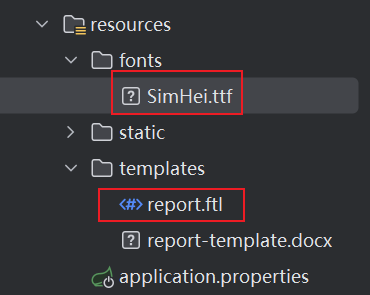
-
SimHei.ttf
下载链接:[https://www.123865.com/s/5yoovd-yVlKd](https://www.123865.com/s/5yoovd-yVlKd) -
report.ftl
<!DOCTYPE html>
<html xmlns="http://www.w3.org/1999/xhtml">
<head><meta http-equiv="Content-Type" content="text/html; charset=UTF-8" /><style type="text/css">body { font-family: SimHei; font-size: 12px; }table { width: 100%; border-collapse: collapse; }th, td { border: 1px solid #333; padding: 6px; text-align: center; }</style>
</head>
<body>
<h2>${title}</h2>
<p>生成日期:${date}</p>
<p>负责人:${author}</p><table><thead><tr><th>姓名</th><th>年龄</th><th>邮箱</th></tr></thead><tbody><#list users as u><tr><td>${u.name}</td><td>${u.age}</td><td>${u.email}</td></tr></#list></tbody>
</table>
</body>
</html>
测试
/*** 下载 PDF 文件*/
@GetMapping("/export1")
public void downloadPdf(HttpServletResponse response) {// 1. 准备数据Map<String, Object> data = new HashMap<>();data.put("title", "用户信息报告");data.put("author", "管理员");data.put("date", new SimpleDateFormat("yyyy-MM-dd").format(new Date()));List<Map<String, Object>> users = new ArrayList<>();users.add(new HashMap<String, Object>() {{put("name", "张三");put("age", 28);put("email", "zhangsan@example.com");}});users.add(new HashMap<String, Object>() {{put("name", "李四");put("age", 32);put("email", "lisi@example.com");}});data.put("users", users);DocumentPrintUtil.generateWebPdf(data, "report.ftl", "测试", true , response);
}/*** 浏览器内预览 PDF*/
@GetMapping("/export2")
public void previewPdf(HttpServletResponse response) {// 1. 准备数据Map<String, Object> data = new HashMap<>();data.put("title", "用户信息报告");data.put("author", "管理员");data.put("date", new SimpleDateFormat("yyyy-MM-dd").format(new Date()));List<Map<String, Object>> users = new ArrayList<>();users.add(new HashMap<String, Object>() {{put("name", "张三");put("age", 28);put("email", "zhangsan@example.com");}});users.add(new HashMap<String, Object>() {{put("name", "李四");put("age", 32);put("email", "lisi@example.com");}});data.put("users", users);DocumentPrintUtil.generateWebDocx(data, "report.ftl", "测试" , response);
}