前置 python 库
在终端中输入以下指令安装库:
pip install pynput
作用
监视总打字量,一分钟打字量和 CPM 并用多样的形式呈现。
使用说明
可以直接拖动窗口调整位置。
可以重置计数器。
可以隐藏窗口,按 Ctrl+Shift+T 显示窗口。
如果在本地使用,在终端输入以下指令以启动:
python example.py
其中 example.py 是您保存的文件名。
效果展示
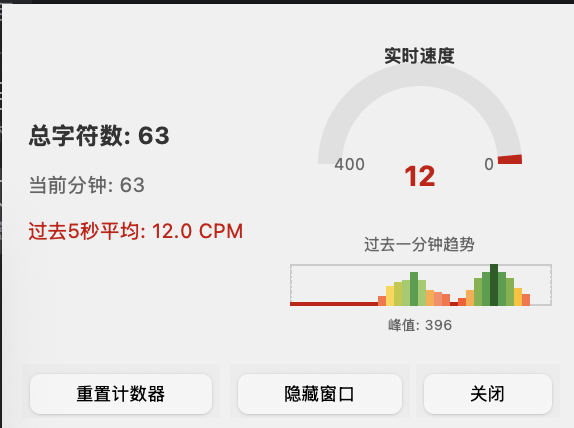
代码
import tkinter as tk
from pynput import keyboard
from collections import deque
import time
from threading import Lock
import mathclass TypingCounter:def __init__(self):self.char_count = 0self.is_counting = Trueself.window_hidden = Falseself.key_timestamps = deque(maxlen=1000)self.timestamps_lock = Lock()self.cpm_history = deque(maxlen=60)self.history_lock = Lock()self.root = tk.Tk()self.root.title("打字计数器 - 按Ctrl+Shift+T显示窗口")self.root.overrideredirect(True)self.root.attributes('-topmost', True)self.root.geometry('+20+70')self.root.configure(bg='#f0f0f0')self.main_container = tk.Frame(self.root, bg='#f0f0f0')self.main_container.pack(padx=10, pady=10)self.stats_frame = tk.Frame(self.main_container, bg='#f0f0f0')self.stats_frame.pack(side='left', padx=(0, 15))self.total_label = tk.Label(self.stats_frame,text="总字符数: 0",font=("Microsoft YaHei", 12, "bold"),bg='#f0f0f0',fg='#333333')self.total_label.pack(anchor='w', pady=(0, 5))self.current_min_label = tk.Label(self.stats_frame,text="当前分钟: 0",font=("Microsoft YaHei", 10),bg='#f0f0f0',fg='#666666')self.current_min_label.pack(anchor='w', pady=(0, 5))self.avg_label = tk.Label(self.stats_frame,text="过去5秒平均: 0 CPM",font=("Microsoft YaHei", 10),bg='#f0f0f0',fg='#228B22')self.avg_label.pack(anchor='w', pady=(0, 5))self.gauge_frame = tk.Frame(self.main_container, bg='#f0f0f0')self.gauge_frame.pack(side='right')self.canvas_width = 140self.canvas_height = 160self.canvas = tk.Canvas(self.gauge_frame,width=self.canvas_width,height=self.canvas_height,bg='#f0f0f0',highlightthickness=0)self.canvas.pack()self.gauge_center_x = self.canvas_width // 2self.gauge_center_y = 70self.gauge_radius = 45self.gauge_width = 12self.chart_x = 5self.chart_y = 120self.chart_width = 130self.chart_height = 20self.gauge_arc = Noneself.gauge_text = Noneself.bar_chart_items = []self.chart_title_text = Noneself.chart_peak_text = Noneself.chart_grid_lines = []self.chart_labels = []self.color_gradient = [(0, 25, '#CC0000'),      # 暗红色(25, 50, '#E64A19'),     # 深橙红色(50, 75, '#FF5722'),     # 橙红色(75, 100, '#FF7043'),    # 亮橙红色(100, 125, '#FF8A65'),   # 浅橙红色(125, 150, '#FFAB40'),   # 橙色(150, 175, '#FFC107'),   # 琥珀色(175, 200, '#FFD740'),   # 浅琥珀色(200, 225, '#C0CA33'),   # 黄绿色(225, 250, '#9CCC65'),   # 浅黄绿色(250, 275, '#7CB342'),   # 浅绿色(275, 300, '#4CAF50'),   # 绿色(300, 325, '#43A047'),   # 深绿色(325, 350, '#388E3C'),   # 更深绿色(350, 375, '#2E7D32'),   # 深绿色(375, 405, '#1B5E20')    # 最深绿色]self.draw_gauge_background()self.draw_chart_background()self.button_frame = tk.Frame(self.root, bg='#f0f0f0')self.button_frame.pack(fill='x', padx=10, pady=(0, 10))self.reset_btn = tk.Button(self.button_frame,text="重置计数器",command=self.reset_counters,font=("Microsoft YaHei", 9),bg='#ff6b6b',fg='black',relief='flat',padx=10,pady=3)self.reset_btn.pack(side='left')self.hide_btn = tk.Button(self.button_frame,text="隐藏窗口",command=self.toggle_window_visibility,font=("Microsoft YaHei", 9),bg='#6b6bff',fg='black',relief='flat',padx=10,pady=3)self.hide_btn.pack(side='left', padx=(5, 0))self.close_btn = tk.Button(self.button_frame,text="关闭",command=self.on_close,font=("Microsoft YaHei", 9),bg='#cccccc',fg='black',relief='flat',padx=10,pady=3)self.close_btn.pack(side='right')self.main_container.bind('<ButtonPress-1>', self.start_move)self.main_container.bind('<ButtonRelease-1>', self.stop_move)self.main_container.bind('<B1-Motion>', self.on_move)self.last_second_update = time.time()self.keyboard_listener = Noneself.start_global_hotkey_listener()self.update_display()def start_global_hotkey_listener(self):def on_activate():if self.window_hidden:self.show_window()def for_canonical(f):return lambda k: f(self.canonical(k))hotkey = keyboard.HotKey(keyboard.HotKey.parse('<ctrl>+<shift>+t'),on_activate)self.keyboard_listener = keyboard.Listener(on_press=for_canonical(hotkey.press),on_release=for_canonical(hotkey.release))self.keyboard_listener.daemon = Trueself.keyboard_listener.start()def canonical(self, key):if key is None:return Nonereturn key.canonical if hasattr(key, 'canonical') else keydef draw_gauge_background(self):self.canvas.create_arc(self.gauge_center_x - self.gauge_radius,self.gauge_center_y - self.gauge_radius,self.gauge_center_x + self.gauge_radius,self.gauge_center_y + self.gauge_radius,start=0,extent=180,style='arc',width=self.gauge_width,outline='#e0e0e0')self.canvas.create_text(self.gauge_center_x - self.gauge_radius + 10,self.gauge_center_y,text="400",font=("Microsoft YaHei", 8),fill='#666666')self.canvas.create_text(self.gauge_center_x + self.gauge_radius - 10,self.gauge_center_y,text="0",font=("Microsoft YaHei", 8),fill='#666666')self.canvas.create_text(self.gauge_center_x,self.gauge_center_y - self.gauge_radius - 10,text="实时速度",font=("Microsoft YaHei", 9, "bold"),fill='#333333')def draw_chart_background(self):self.canvas.create_rectangle(self.chart_x,self.chart_y,self.chart_x + self.chart_width,self.chart_y + self.chart_height,outline='#cccccc',width=1)self.chart_title_text = self.canvas.create_text(self.chart_x + self.chart_width // 2,self.chart_y - 10,text="过去一分钟趋势",font=("Microsoft YaHei", 8),fill='#666666')def toggle_window_visibility(self):if self.window_hidden:self.show_window()else:self.hide_window()def hide_window(self):self.root.attributes('-alpha', 0.0)self.root.attributes('-topmost', False)self.window_hidden = Trueself.hide_btn.config(text="窗口已隐藏 (Ctrl+Shift+T显示)")self.root.title("打字计数器 - 窗口已隐藏,按Ctrl+Shift+T显示")def show_window(self):self.root.attributes('-alpha', 1.0)self.root.attributes('-topmost', True)self.window_hidden = Falseself.hide_btn.config(text="隐藏窗口")self.root.title("打字计数器 - 按Ctrl+Shift+T显示窗口")self.root.focus_force()def update_chart_background(self, max_cpm):for item in self.chart_grid_lines + self.chart_labels:self.canvas.delete(item)self.chart_grid_lines = []self.chart_labels = []if max_cpm < 10:max_cpm = 10interval = 50num_intervals = int(math.ceil(max_cpm / interval))for i in range(num_intervals + 1):value = i * intervaly = self.chart_y + self.chart_height - (value / max_cpm) * self.chart_heightif y >= self.chart_y:line_id = self.canvas.create_line(self.chart_x, y,self.chart_x + self.chart_width, y,fill='#f0f0f0' if value > 0 else '#cccccc',width=1)self.chart_grid_lines.append(line_id)label_id = self.canvas.create_text(self.chart_x - 5,y,text=str(value),font=("Microsoft YaHei", 6),fill='#999999',anchor='e')self.chart_labels.append(label_id)if self.chart_peak_text:self.canvas.delete(self.chart_peak_text)self.chart_peak_text = self.canvas.create_text(self.chart_x + self.chart_width // 2,self.chart_y + self.chart_height + 10,text=f"峰值: {int(max_cpm)}",font=("Microsoft YaHei", 7),fill='#666666')def get_color_for_cpm(self, cpm):clamped_cpm = max(0, min(400, cpm))for min_val, max_val, color in self.color_gradient:if min_val <= clamped_cpm < max_val:return colorreturn '#00FF00'def update_gauge(self, cpm_value):cpm_clamped = max(0, min(400, cpm_value))angle = (cpm_clamped / 400) * 180color = self.get_color_for_cpm(cpm_clamped)if self.gauge_arc:self.canvas.delete(self.gauge_arc)self.gauge_arc = self.canvas.create_arc(self.gauge_center_x - self.gauge_radius,self.gauge_center_y - self.gauge_radius,self.gauge_center_x + self.gauge_radius,self.gauge_center_y + self.gauge_radius,start=0,extent=angle,style='arc',width=self.gauge_width,outline=color)if self.gauge_text:self.canvas.delete(self.gauge_text)self.gauge_text = self.canvas.create_text(self.gauge_center_x,self.gauge_center_y + 5,text=f"{int(cpm_clamped)}",font=("Microsoft YaHei", 14, "bold"),fill=color)def update_chart(self):for item in self.bar_chart_items:self.canvas.delete(item)self.bar_chart_items = []with self.history_lock:history = list(self.cpm_history)if not history:if self.chart_peak_text:self.canvas.itemconfig(self.chart_peak_text, text="峰值: 0")returnif len(history) > 30:history = history[-30:]bar_count = len(history)if bar_count == 0:returnpeak_cpm = max(history)display_max = max(peak_cpm, 10)self.update_chart_background(display_max)bar_width = max(1, (self.chart_width - bar_count + 1) // bar_count)spacing = 1for i, cpm in enumerate(history):if display_max > 0:bar_height = (cpm / display_max) * self.chart_heightbar_height = max(1, bar_height)else:bar_height = 1bar_height = min(bar_height, self.chart_height)x1 = self.chart_x + i * (bar_width + spacing)y1 = self.chart_y + self.chart_height - bar_heightx2 = x1 + bar_widthy2 = self.chart_y + self.chart_heightcolor = self.get_color_for_cpm(cpm)bar_id = self.canvas.create_rectangle(x1, y1, x2, y2,fill=color,outline=color,width=1)self.bar_chart_items.append(bar_id)def record_cpm_history(self, cpm_value):current_time = time.time()if current_time - self.last_second_update >= 1.0:with self.history_lock:self.cpm_history.append(cpm_value)self.last_second_update = current_timedef calculate_cpm(self):current_time = time.time()five_seconds_ago = current_time - 5with self.timestamps_lock:recent_keys = [ts for ts in self.key_timestamps if ts >= five_seconds_ago]count = len(recent_keys)if count >= 1:time_window = 5else:return 0.0if time_window > 0:cpm = (count / time_window) * 60else:cpm = 0.0return round(cpm, 1)def calculate_current_minute(self):current_time = time.time()one_minute_ago = current_time - 60with self.timestamps_lock:count = sum(1 for ts in self.key_timestamps if ts >= one_minute_ago)return countdef on_press(self, key):if not self.is_counting:returntry:if hasattr(key, 'char') and key.char:self.char_count += 1# 记录按键时间戳with self.timestamps_lock:self.key_timestamps.append(time.time())except AttributeError:passdef update_display(self):cpm = self.calculate_cpm()current_min_count = self.calculate_current_minute()self.record_cpm_history(cpm)self.total_label.config(text=f"总字符数: {self.char_count}")self.current_min_label.config(text=f"当前分钟: {current_min_count}")self.avg_label.config(text=f"过去5秒平均: {cpm} CPM")self.update_gauge(cpm)self.update_chart()color = self.get_color_for_cpm(cpm)self.avg_label.config(fg=color)self.root.after(100, self.update_display)def reset_counters(self):self.char_count = 0with self.timestamps_lock:self.key_timestamps.clear()with self.history_lock:self.cpm_history.clear()def start_move(self, event):self.x = event.xself.y = event.ydef stop_move(self, event):self.x = Noneself.y = Nonedef on_move(self, event):deltax = event.x - self.xdeltay = event.y - self.yx = self.root.winfo_x() + deltaxy = self.root.winfo_y() + deltayself.root.geometry(f"+{x}+{y}")def on_close(self):self.is_counting = Falseif self.keyboard_listener:self.keyboard_listener.stop()self.root.destroy()def run(self):listener = keyboard.Listener(on_press=self.on_press)listener.daemon = Truelistener.start()self.root.mainloop()if __name__ == "__main__":counter = TypingCounter()counter.run()