1、安装OpenSSL
macOS系统中其实本身自带openssl,但并不是官方 OpenSSL,且在不同系统版本中可能存在版本比较老的问题。因此,在 macOS上进行 OpenSSL 相关开发时,更推荐通过 Homebrew 单独安装并使用 OpenSSL。
brew安装OpenSSL3指令:
brew install openssl@3
安装完成之后,查看OpenSSL3安装的路径的指令:
brew --prefix openssl@3
通常会输出以下路径:

2、跑一个 OpenSSL demo
为了快速验证OpenSSL是否配置或者安装成功,可以直接去openssl的github网址 https://github.com/openssl/openssl/tree/master/demos,找一段demo,复制到本地的vscode里,本文选择的是其中AES-CCM的demo:
/** Copyright 2013-2025 The OpenSSL Project Authors. All Rights Reserved.** Licensed under the Apache License 2.0 (the "License").  You may not use* this file except in compliance with the License.  You can obtain a copy* in the file LICENSE in the source distribution or at* https://www.openssl.org/source/license.html*//** Simple AES CCM authenticated encryption with additional data (AEAD)* demonstration program.*/#include <stdio.h>
#include <openssl/err.h>
#include <openssl/bio.h>
#include <openssl/evp.h>
#include <openssl/core_names.h>/* AES-CCM test data obtained from NIST public test vectors *//* AES key */
static const unsigned char ccm_key[] = {0xce, 0xb0, 0x09, 0xae, 0xa4, 0x45, 0x44, 0x51, 0xfe, 0xad, 0xf0, 0xe6,0xb3, 0x6f, 0x45, 0x55, 0x5d, 0xd0, 0x47, 0x23, 0xba, 0xa4, 0x48, 0xe8
};/* Unique nonce to be used for this message */
static const unsigned char ccm_nonce[] = {0x76, 0x40, 0x43, 0xc4, 0x94, 0x60, 0xb7
};/** Example of Additional Authenticated Data (AAD), i.e. unencrypted data* which can be authenticated using the generated Tag value.*/
static const unsigned char ccm_adata[] = {0x6e, 0x80, 0xdd, 0x7f, 0x1b, 0xad, 0xf3, 0xa1, 0xc9, 0xab, 0x25, 0xc7,0x5f, 0x10, 0xbd, 0xe7, 0x8c, 0x23, 0xfa, 0x0e, 0xb8, 0xf9, 0xaa, 0xa5,0x3a, 0xde, 0xfb, 0xf4, 0xcb, 0xf7, 0x8f, 0xe4
};/* Example plaintext to encrypt */
static const unsigned char ccm_pt[] = {0xc8, 0xd2, 0x75, 0xf9, 0x19, 0xe1, 0x7d, 0x7f, 0xe6, 0x9c, 0x2a, 0x1f,0x58, 0x93, 0x9d, 0xfe, 0x4d, 0x40, 0x37, 0x91, 0xb5, 0xdf, 0x13, 0x10
};/* Expected ciphertext value */
static const unsigned char ccm_ct[] = {0x8a, 0x0f, 0x3d, 0x82, 0x29, 0xe4, 0x8e, 0x74, 0x87, 0xfd, 0x95, 0xa2,0x8a, 0xd3, 0x92, 0xc8, 0x0b, 0x36, 0x81, 0xd4, 0xfb, 0xc7, 0xbb, 0xfd
};/* Expected AEAD Tag value */
static const unsigned char ccm_tag[] = {0x2d, 0xd6, 0xef, 0x1c, 0x45, 0xd4, 0xcc, 0xb7, 0x23, 0xdc, 0x07, 0x44,0x14, 0xdb, 0x50, 0x6d
};/** A library context and property query can be used to select & filter* algorithm implementations. If they are NULL then the default library* context and properties are used.*/
static OSSL_LIB_CTX *libctx = NULL;
static const char *propq = NULL;static int aes_ccm_encrypt(void)
{int ret = 0;EVP_CIPHER_CTX *ctx;EVP_CIPHER *cipher = NULL;int outlen, tmplen;size_t ccm_nonce_len = sizeof(ccm_nonce);size_t ccm_tag_len = sizeof(ccm_tag);unsigned char outbuf[1024];unsigned char outtag[16];OSSL_PARAM params[3] = {OSSL_PARAM_END, OSSL_PARAM_END, OSSL_PARAM_END};printf("AES CCM Encrypt:\n");printf("Plaintext:\n");BIO_dump_fp(stdout, ccm_pt, sizeof(ccm_pt));/* Create a context for the encrypt operation */if ((ctx = EVP_CIPHER_CTX_new()) == NULL)goto err;/* Fetch the cipher implementation */if ((cipher = EVP_CIPHER_fetch(libctx, "AES-192-CCM", propq)) == NULL)goto err;/* Default nonce length for AES-CCM is 7 bytes (56 bits). */params[0] = OSSL_PARAM_construct_size_t(OSSL_CIPHER_PARAM_AEAD_IVLEN,&ccm_nonce_len);/* Set tag length */params[1] = OSSL_PARAM_construct_octet_string(OSSL_CIPHER_PARAM_AEAD_TAG,NULL, ccm_tag_len);/** Initialise encrypt operation with the cipher & mode,* nonce length and tag length parameters.*/if (!EVP_EncryptInit_ex2(ctx, cipher, NULL, NULL, params))goto err;/* Initialise key and nonce */if (!EVP_EncryptInit_ex(ctx, NULL, NULL, ccm_key, ccm_nonce))goto err;/* Set plaintext length: only needed if AAD is used */if (!EVP_EncryptUpdate(ctx, NULL, &outlen, NULL, sizeof(ccm_pt)))goto err;/* Zero or one call to specify any AAD */if (!EVP_EncryptUpdate(ctx, NULL, &outlen, ccm_adata, sizeof(ccm_adata)))goto err;/* Encrypt plaintext: can only be called once */if (!EVP_EncryptUpdate(ctx, outbuf, &outlen, ccm_pt, sizeof(ccm_pt)))goto err;/* Output encrypted block */printf("Ciphertext:\n");BIO_dump_fp(stdout, outbuf, outlen);/* Finalise: note get no output for CCM */if (!EVP_EncryptFinal_ex(ctx, NULL, &tmplen))goto err;/* Get tag */params[0] = OSSL_PARAM_construct_octet_string(OSSL_CIPHER_PARAM_AEAD_TAG,outtag, ccm_tag_len);params[1] = OSSL_PARAM_construct_end();if (!EVP_CIPHER_CTX_get_params(ctx, params))goto err;/* Output tag */printf("Tag:\n");BIO_dump_fp(stdout, outtag, (int)ccm_tag_len);ret = 1;
err:if (!ret)ERR_print_errors_fp(stderr);EVP_CIPHER_free(cipher);EVP_CIPHER_CTX_free(ctx);return ret;
}static int aes_ccm_decrypt(void)
{int ret = 0;EVP_CIPHER_CTX *ctx;EVP_CIPHER *cipher = NULL;int outlen, rv;unsigned char outbuf[1024];size_t ccm_nonce_len = sizeof(ccm_nonce);OSSL_PARAM params[3] = {OSSL_PARAM_END, OSSL_PARAM_END, OSSL_PARAM_END};printf("AES CCM Decrypt:\n");printf("Ciphertext:\n");BIO_dump_fp(stdout, ccm_ct, sizeof(ccm_ct));if ((ctx = EVP_CIPHER_CTX_new()) == NULL)goto err;/* Fetch the cipher implementation */if ((cipher = EVP_CIPHER_fetch(libctx, "AES-192-CCM", propq)) == NULL)goto err;/* Set nonce length if default 96 bits is not appropriate */params[0] = OSSL_PARAM_construct_size_t(OSSL_CIPHER_PARAM_AEAD_IVLEN,&ccm_nonce_len);/* Set tag length */params[1] = OSSL_PARAM_construct_octet_string(OSSL_CIPHER_PARAM_AEAD_TAG,(unsigned char *)ccm_tag,sizeof(ccm_tag));/** Initialise decrypt operation with the cipher & mode,* nonce length and expected tag parameters.*/if (!EVP_DecryptInit_ex2(ctx, cipher, NULL, NULL, params))goto err;/* Specify key and IV */if (!EVP_DecryptInit_ex(ctx, NULL, NULL, ccm_key, ccm_nonce))goto err;/* Set ciphertext length: only needed if we have AAD */if (!EVP_DecryptUpdate(ctx, NULL, &outlen, NULL, sizeof(ccm_ct)))goto err;/* Zero or one call to specify any AAD */if (!EVP_DecryptUpdate(ctx, NULL, &outlen, ccm_adata, sizeof(ccm_adata)))goto err;/* Decrypt plaintext, verify tag: can only be called once */rv = EVP_DecryptUpdate(ctx, outbuf, &outlen, ccm_ct, sizeof(ccm_ct));/* Output decrypted block: if tag verify failed we get nothing */if (rv > 0) {printf("Tag verify successful!\nPlaintext:\n");BIO_dump_fp(stdout, outbuf, outlen);} else {printf("Tag verify failed!\nPlaintext not available\n");goto err;}ret = 1;
err:if (!ret)ERR_print_errors_fp(stderr);EVP_CIPHER_free(cipher);EVP_CIPHER_CTX_free(ctx);return ret;
}int main(int argc, char **argv)
{if (!aes_ccm_encrypt())return EXIT_FAILURE;if (!aes_ccm_decrypt())return EXIT_FAILURE;return EXIT_SUCCESS;
}
为了避免每次都要输入比较长的编译指令,可以直接把编译指令保存在shell脚本里面,后续可以重复使用。
新建一个build.sh文件,输入以下内容:
#!/bin/bashset -e # 任意命令失败就立即退出脚本OPENSSL=$(brew --prefix openssl@3) # OpenSSL 安装路径
SRC=ssl_aes_ccm.c                  # 源文件
OUT=aes_ccm_demo                   # 输出的可执行文件名clang "$SRC" \-I "$OPENSSL/include" \-L "$OPENSSL/lib" \-lcrypto \-o "$OUT"echo "build ok -> ./$OUT"
保存文件后,还需要为脚本添加可执行的权限:chmod +x build.sh,之后就可以直接在终端中执行命令:./build.sh
如果编译成功,会在当前目录下生成一个可执行文件aes_ccm_demo,通过./aes_ccm_demo命令便可执行这个二进制文件,输出内容:
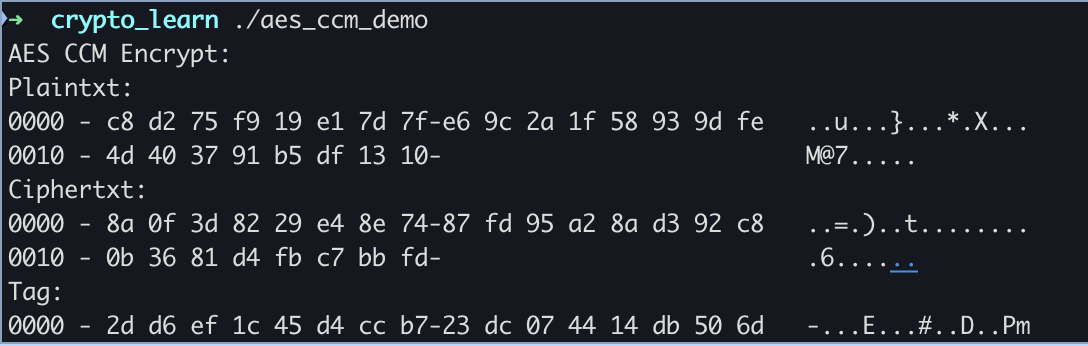
至此,OpenSSL的开发环境就准备好了。